# Create Form Builder Form attribute
Create Form Builder Form attribute.
Editions: Experience
You can create a Form attribute for new Form fields or existing ones. To do it, you have to define a new Form attribute in the configuration.
In the following example you can learn how to create the new Form with `richtext_description` attribute that allows you to add formatted description to the Form.
## Configure Form attribute
To create a `richtext_description` attribute, add the following configuration under the `ibexa_form_builder.fields` [configuration key](https://doc.ibexa.co/en/latest/administration/configuration/configuration/#configuration-files):
```yaml
ibexa_form_builder:
fields:
checkbox_with_richtext_description:
name: Checkbox with Rich Text description
category: Default
thumbnail: '/bundles/ibexaadminuiassets/vendors/ids-assets/dist/img/all-icons.svg#form-input-single-line'
attributes:
label:
name: Label
type: string
validators:
not_blank:
message: You must provide label of the field
richtext_description:
name: 'Description'
type: 'richtext_description'
validators:
required: ~
```
## Create mapper
The new Form attribute requires a `FieldAttributeTypeMapper`. Register the mapper as a service in `config/services.yaml`:
```yaml
App\FormBuilder\FieldType\Field\Mapper\CheckboxWithRichtextDescriptionFieldMapper:
arguments:
$fieldIdentifier: checkbox_with_richtext_description
$formType: 'App\FormBuilder\Form\Type\CheckboxWithRichtextDescriptionType'
tags:
- { name: ibexa.form_builder.field.mapper }
ibexa.form_builder.attribute_form_type_mapper.richtext_description:
class: Ibexa\FormBuilder\Form\Mapper\FieldAttribute\GenericFieldAttributeTypeMapper
arguments:
$formTypeClass: App\FormBuilder\Form\Type\FieldAttribute\AttributeRichtextDescriptionType
$typeIdentifier: 'richtext_description'
tags:
- { name: ibexa.form_builder.form.type.attribute.mapper }
App\FormBuilder\FormSubmission\Converter\RichtextDescriptionFieldSubmissionConverter:
arguments:
$typeIdentifier: 'checkbox_with_richtext_description'
$twig: '@twig'
tags:
- { name: ibexa.form_builder.field.submission.converter }
```
## Add Symfony form type
The attribute must be editable for the form creator, so it needs to have a Symfony form type. Add an `AttributeRichtextDescriptionType.php` file with the form type in the `src/FormBuilder/Form/Type/FieldAttribute` directory:
```php
{% set udw_context = {
'languageCode': 'en',
} %}
{{ form_errors(form) }}
{{ form_row(form) }}
{{ encore_entry_script_tags('formbuilder-richtext-checkbox-js') }}
{% endblock %}
```
- `templates/themes//formtheme/formbuilder_checkbox_with_richtext_description.html.twig`:
```html+twig
{% block checkbox_with_richtext_description_row %}
{{ form_label(form)}}
{{ form_errors(form) }}
{{ form_widget(form) }}
{{ form.vars.richtextDescription|ibexa_richtext_to_html5() }}
{% endblock %}
```
Then, specify the new template in configuration, under the `twig.form_themes` configuration key:
```yaml
twig:
form_themes:
- '@ibexadesign/formtheme/formbuilder_checkbox_with_richtext_description.html.twig'
```
## Add scripts
Now you need to enable the Rich Text editor. Provide the required script in a new `assets/js/formbuilder-richtext-checkbox.js` file:
```js
(function (global, doc, ibexa) {
global.addEventListener('load', (event) => {
const richtext = new ibexa.BaseRichText();
// Enable editor in all ibexa-data-source divs
doc.querySelectorAll('.ibexa-data-source').forEach((ibexaDataSource) => {
const richtextContainer = ibexaDataSource.querySelector('.ibexa-data-source__richtext');
if (richtextContainer.classList.contains('ck')) {
return;
}
richtext.init(richtextContainer);
});
});
const openUdw = (config) => {
const openUdwEvent = new CustomEvent('ibexa-open-udw', { detail: config });
doc.body.dispatchEvent(openUdwEvent);
};
ibexa.addConfig('richText.alloyEditor.callbacks.selectContent', openUdw);
})(window, window.document, window.ibexa);
```
Then, paste the highlighted part of the code into the `webpack.config.js` file:
```js
const Encore = require('@symfony/webpack-encore');
const path = require('path');
const getIbexaConfig = require('./ibexa.webpack.config.js');
const ibexaConfig = getIbexaConfig(Encore);
const customConfigs = require('./ibexa.webpack.custom.configs.js');
const { isReactBlockPathCreated } = require('./ibexa.webpack.config.react.blocks.js');
Encore.reset();
Encore
.setOutputPath('public/build/')
.setPublicPath('/build')
.enableStimulusBridge('./assets/controllers.json')
.enableSassLoader()
.enableReactPreset()
.enableSingleRuntimeChunk()
.copyFiles({
from: './assets/images',
to: 'images/[path][name].[ext]',
pattern: /\.(png|svg)$/
})
.configureBabel((config) => {
config.plugins.push('@babel/plugin-proposal-class-properties');
})
// enables @babel/preset-env polyfills
.configureBabelPresetEnv((config) => {
config.useBuiltIns = 'usage';
config.corejs = 3;
})
;
// Welcome page stylesheets
Encore.addEntry('welcome-page-css', [
path.resolve(__dirname, './assets/scss/welcome-page.scss'),
]);
// Welcome page javascripts
Encore.addEntry('welcome-page-js', [
path.resolve(__dirname, './assets/js/welcome.page.js'),
]);
if (isReactBlockPathCreated) {
// React Blocks javascript
Encore.addEntry('react-blocks-js', './assets/js/react.blocks.js');
}
Encore.addEntry('app', './assets/app.js');
Encore.addEntry('formbuilder-richtext-checkbox-js', './assets/js/formbuilder-richtext-checkbox.js');
const projectConfig = Encore.getWebpackConfig();
projectConfig.name = 'app';
module.exports = [ibexaConfig, ...customConfigs, projectConfig];
// uncomment this line if you've commented-out the above lines
// module.exports = [ eZConfig, ibexaConfig, ...customConfigs ];
```
Clear the cache and regenerate the assets by running the following commands:
```bash
php bin/console cache:clear
php bin/console assets:install
yarn encore dev
```
## Implement field
Now you have to implement the field, and make sure the value from the Rich Text attribute is passed on to the field form.
Create a `src/FormBuilder/Form/Type/CheckboxWithRichtextDescriptionType.php` file.
```php
setDefaults([
'richtext_description' => '',
]);
$resolver->setAllowedTypes('richtext_description', ['null', 'string']);
}
public function buildView(FormView $view, FormInterface $form, array $options): void
{
// pass the Dom object of the richtext doc to the template
$dom = new \DOMDocument();
if (!empty($options['richtext_description'])) {
$dom->loadXML($options['richtext_description']);
}
$view->vars['richtextDescription'] = $dom;
}
}
```
## Implement field mapper
To implement a field mapper, create a `src/FormBuilder/FieldType/Field/Mapper/CheckboxWithRichtextDescriptionFieldMapper.php` file.
```php
getAttributeValue('label');
$options['richtext_description'] = $field->getAttributeValue('richtext_description');
return $options;
}
}
```
Now, the attribute value can be stored in the new Form.
## Create submission converter
The new field is based on a checkbox, so to display the submissions of this field, you can use the `BooleanFieldSubmissionConverter`.
Create a `src/FormBuilder/FormSubmission/Converter/RichtextDescriptionFieldSubmissionConverter.php` file.
```php
**Forms** -> **Create content**, and select **Form**.
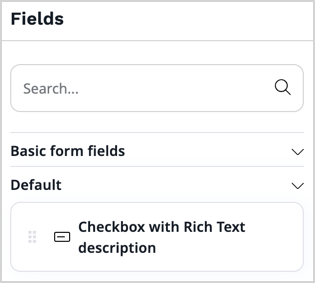
You should be able to see the new section in the list of available fields:
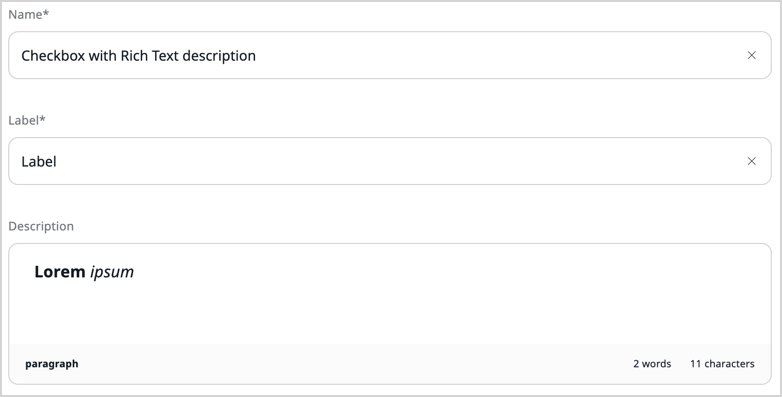
When editing settings, the "Description" attribute has the Rich Text input.
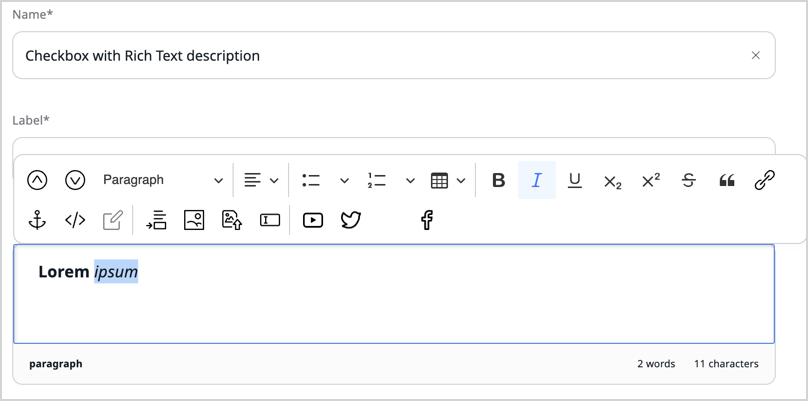
When you enter the "Description" attribute, the Rich Text toolbar appears.
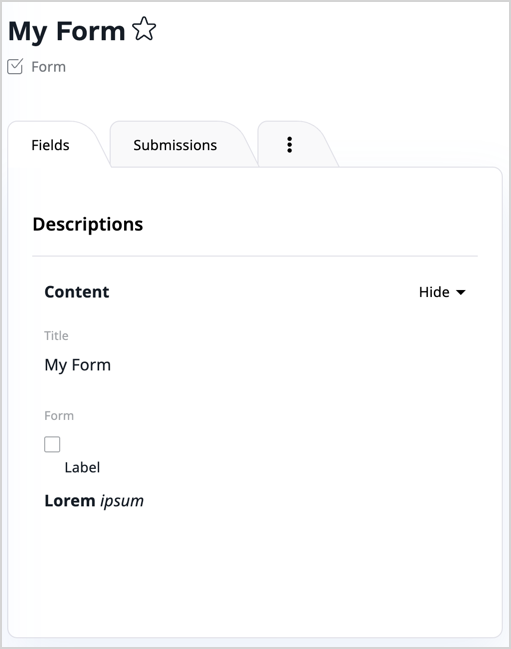
The preview displays the formatted text along with the checkbox and its label.